
Short Summary
When modern PC games demand more video memory (VRAM) than a graphics card physically possesses, performance often plummets, or games crash outright. Kernel updates lined up for Linux 7.3 change how the operating system handles this exact scenario. By resolving long-standing driver deadlocks, avoiding wasteful memory thrashing, and respecting application memory priorities, Linux is making VRAM overcommitment far less painful for gamers.
Introduction
Nothing ruins an immersive gaming session faster than running out of video RAM (VRAM). As modern graphics engines push high-resolution textures, complex ray tracing pipelines, and expansive open worlds, memory requirements have soared. Gamers holding onto graphics cards with 8GB or 10GB of VRAM often find themselves hitting a hard wall where titles either stutter uncontrollably or crash straight to the desktop.
Traditionally, running out of dedicated graphics memory was viewed as a fatal performance bottleneck. If a game needs more VRAM than the physical hardware provides, the graphics processing unit (GPU) must offload data into the system’s main RAM (CPU memory) across the PCIe bus. Because system RAM is substantially slower than high-speed VRAM, performance usually tanks.
However, Linux driver developers have been quietly overhaul-engineering how the kernel and display stack manage low-memory scenarios. With key patchsets officially merged upstream for Linux 7.3, the open-source gaming ecosystem—spearheaded by improvements tested within SteamOS—is demonstrating that running out of VRAM doesn’t have to break your gaming experience.
What Happened?
Graphics driver developers have successfully merged critical VRAM management improvements into the upstream Linux kernel, scheduled for full release in Linux 7.3. Building on earlier memory management work, these patches directly address the stability and performance flaws that occur when games request more VRAM than a GPU physically has available.
Historically, overcommitting VRAM on Linux frequently triggered system-level stability errors or caused severe performance loss due to continuous, unnecessary data transfers. The updated kernel code fixes deadlocks in the driver lock architecture, introduces smart throttling heuristics to reduce “ping-pong” memory swapping, and establishes a system for sorting memory allocations based on how critical they are to the running game.
Many of these fixes have already undergone real-world testing within Valve’s SteamOS environment on the Steam Deck and Desktop Linux setups. The upstream merge ensures that all Linux distributions—ranging from Arch and Fedora to Ubuntu—will benefit natively from these optimizations out of the box.
Why It Matters
VRAM scarcity is one of the most frustrating hardware limitations in modern PC gaming. When a game demands 10GB of video memory on an 8GB graphics card, the operating system must make tough choices about where to put that extra 2GB of data.
In an ideal world, exceeding physical VRAM limits should only cause a moderate hit to frame rates while keeping the game completely stable. In practice, however, drivers have often succumbed to stability crashes or extreme stuttering, dropping frame rates from 60 FPS down to single digits.
Fixing these issues matters for several key reasons:
- Hardware Longevity: Gamers holding onto older or mid-range GPUs (like 8GB cards) can play demanding next-gen titles without immediate, forced hardware upgrades.
- Handheld Console Optimization: Mobile gaming devices like the Steam Deck share a single pool of unified memory between the CPU and GPU. Smart allocation prevents system instability under heavy graphical loads.
- Seamless Linux Gaming: As gaming on Linux continues to grow via Proton and Wine, matching or exceeding Windows’ VRAM management capability is vital for platform adoption.
Technical Explanation
To understand why running out of VRAM creates such massive bottlenecks, we need to look at how GPUs access memory and how the Linux kernel manages hardware access.
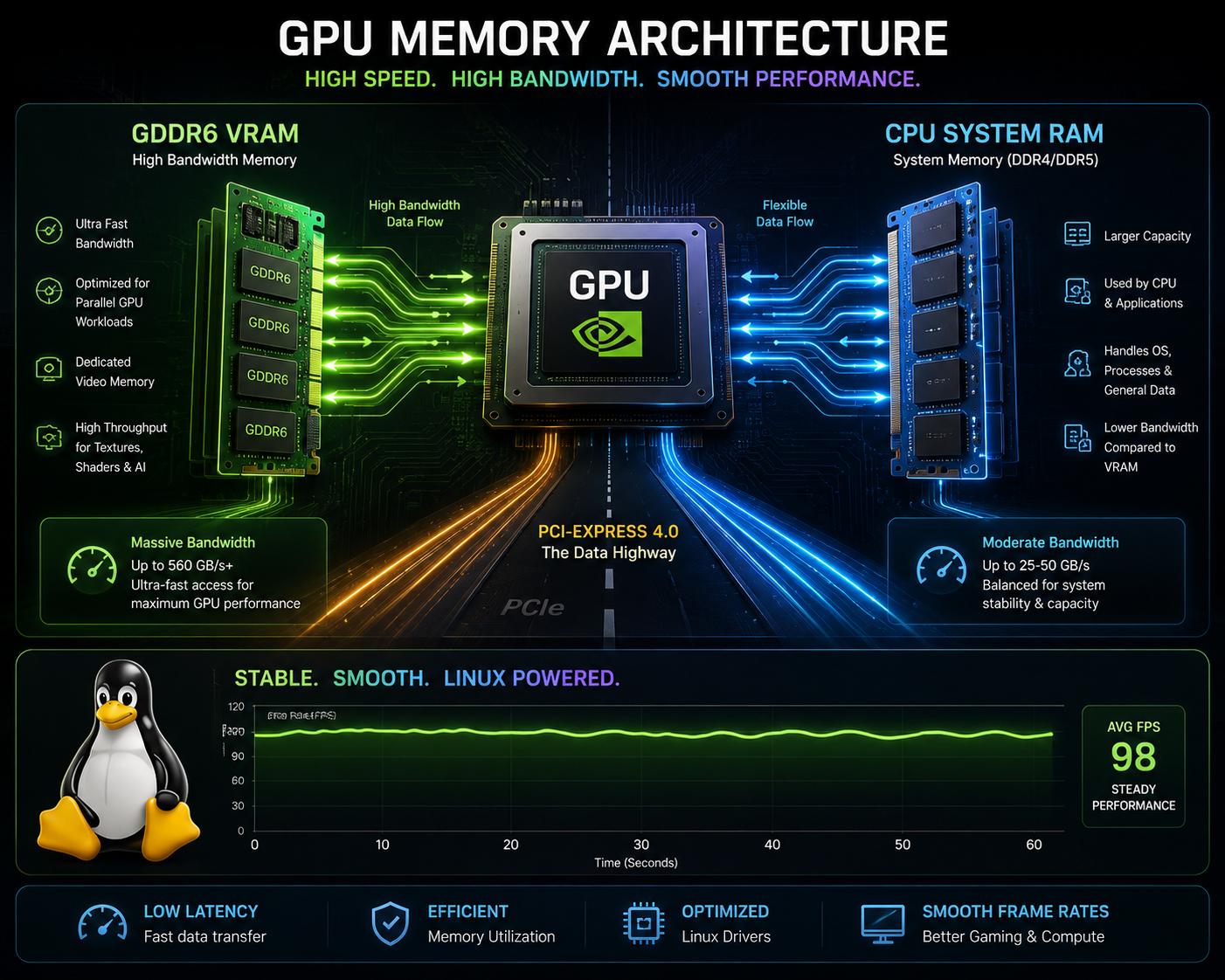
+-----------------------------------------------------------------------+
|                             GPU CORE                                  |
+-----------------------------------------------------------------------+
        |                                       |
        | (Fast / High Bandwidth)               | (Slower / PCIe Limited)
        v                                       v
+-----------------------+               +-----------------------+
|  Dedicated VRAM       |               |  System RAM (CPU)     |
|  (e.g., GDDR6 / HBM)  |               |  (PCIe Bus Overhead)  |
+-----------------------+               +-----------------------+
The PCIe Bandwidth Wall
Dedicated GPU memory (GDDR6 or HBM) sits directly on the graphics card and provides massive memory bandwidth—often anywhere from 300 GB/s to well over 1,000 GB/s. System RAM, by contrast, sits on the motherboard. When the GPU accesses data stored in CPU memory, it must transfer that information over the PCI Express (PCIe) slot.
Even on a fast PCIe 4.0 x16 connection, total bandwidth is capped at roughly 32 GiB/s. If a game targets 30 FPS, it has roughly 33.3 milliseconds to render a frame. Dividing the PCIe bandwidth across that time window reveals that a GPU can only pull about 1 GiB of data from CPU memory per frame. If evicted game files force the GPU to read more than 1 GiB across PCIe in a single frame, maintaining a stable 30 FPS becomes physically impossible.
Caching and Access Patterns
Not all GPU memory accesses are equal. Small allocations like command buffers (the instructions telling the GPU what to draw) can sit in CPU memory with virtually zero performance impact because they fit inside the GPU’s high-speed L2 cache. Once loaded into the cache, access speeds match native VRAM.
However, large graphical assets—such as high-resolution textures, shadow maps, and uncompressed mesh data—frequently bypass or miss the cache. If these assets are evicted to system RAM, every texture read incur a massive latency penalty, dragging down rendering speeds.
Resolving Kernel Deadlocks
When VRAM fills up, the Linux Translation Table Manager (TTM) must evict older memory blocks to CPU RAM to make space for incoming data. To move a memory allocation safely, the kernel must acquire a software lock on that allocation.
During heavy memory contention, multi-threaded graphics submissions can easily hit a classic “ABBA deadlock”:
- Submission A locks Buffer 1 and requests Buffer 2.
- Submission B locks Buffer 2 and requests Buffer 1.
- Both submissions freeze, waiting on each other.
The kernel detects this situation and raises an -EDEADLCK error to abort one of the transactions. Previously, however, the GPU memory driver layer failed to properly handle this retry loop during eviction, returning a generic out-of-memory error (-ENOMEM) instead. This caused games to crash immediately during heavy VRAM load. Linux 7.3 integrates better locking mechanics via the drm_exec helper inside TTM, allowing the kernel to safely retry locked transactions without crashing the graphics driver.
Key Highlights
- Upstream Release: Core driver fixes are queued for the Linux 7.3 kernel cycle.
- Eliminated Driver Crashes: Resolves
-ENOMEMcommand submission failures caused by locking deadlocks inside TTM. - Thrashing Prevention: Introduces “hard throttle” and “soft throttle” timers to prevent games and background compositors (like Gamescope) from constantly swapping the same memory back and forth.
- Scanout Allocation Optimization: Addresses severe fragmentation issues where display scanout buffers forced up to 4GB of graphics assets to be needlessly evicted.
- Memory Priority Integration: Translates Vulkan (
VK_EXT_pageable_device_local_memory) and Direct3D 12 (SetResidencyPriority) hints into sorted kernel LRU lists, ensuring low-priority assets are evicted long before critical game engine data.
Benefits
These driver overhaul efforts yield tangible real-world benefits for gamers running Linux-based operating systems:
- Playable Overcommitted Games: Titles requesting 9GB or 10GB of VRAM on an 8GB GPU can maintain smooth, playable frame rates (e.g., holding 30–50 FPS in modern AAA titles like Indiana Jones: The Great Circle) instead of stalling completely.
- Consistent Frame Times: Eliminates massive frame-time spikes and micro-stuttering caused by aggressive “ping-pong” memory eviction loops.
- Rock-Solid Stability: Gamers no longer have to worry about random crashes to desktop simply because a game spiked in video memory consumption during a dense scene.
- Better Task Switching: Exiting to the Steam overlay or alt-tabbing to another desktop window won’t permanently wreck a game’s performance profile once you switch back.
Challenges
Despite these major leaps forward, overcommitting VRAM remains an uphill battle against raw hardware limits.
Application Awareness
Kernel drivers can only guess which allocations matter most based on past usage patterns. While APIs like Direct3D 12 and Vulkan allow games to label asset priorities (e.g., labeling critical geometry as high priority and distant background textures as low priority), not all game engines actually implement these extensions. Without application-level hints, the kernel must fall back on basic heuristics.
Physical Contiguity Constraints
Certain hardware subsystems, like display controllers responsible for driving your monitor output, bypass GPU virtual memory entirely. They require physically contiguous blocks of memory. If VRAM is heavily fragmented when a scanout image needs to be allocated, the driver may still be forced to evict hundreds of megabytes of unrelated game memory just to create one clean, continuous slot.
Future Outlook
The work landing in Linux 7.3 lays a foundation for closer communication between game engines, translation layers like Proton/VKD3D, and the Linux graphics kernel.
As game developers increasingly adopt Vulkan and DirectX 12 native memory management features, Linux will be able to handle low-VRAM conditions with near-surgical precision. Instead of blindly evicting whatever asset hasn’t been used in the last few frames, drivers will seamlessly push low-mip texture maps or distant background detail into CPU RAM while keeping core shaders and active geometry pinned safely inside VRAM.
Furthermore, these improvements set a benchmark for handheld APUs and unified memory architectures, ensuring future portable gaming devices handle high-fidelity graphics with maximum stability.
Our Analysis
For years, the standard advice for PC gamers running out of video memory was simple: lower your texture quality, reduce render resolution, or buy a card with more VRAM. While software can’t magically synthesize physical silicon, Linux 7.3 proves that intelligent software design can drastically cushion the fall when hardware limits are breached.
By treating memory overcommitment as a managed performance curve rather than an unrecoverable failure state, Linux driver engineers have closed a major gap in the PC gaming stack. Valve’s willingness to test and refine these low-level kernel routines in SteamOS before pushing them upstream demonstrates the strength of open-source graphics development. The end result is a measurably smoother experience for millions of PC gamers operating on mid-range hardware.
FAQ
What happens when a game runs out of VRAM?
When a game uses more VRAM than your graphics card possesses, the driver moves extra data into your computer’s main system RAM. Because system RAM accesses must cross the slower PCIe bus, this can cause stuttering, reduced frame rates, or system crashes if managed poorly.
Will Linux 7.3 increase my graphics card’s actual VRAM?
No. Software updates cannot add physical memory to your GPU. However, Linux 7.3 optimizes how the system handles running out of memory, preventing crashes and minimizing frame rate drops when your VRAM is fully exhausted.
Do I need to reconfigure my games to benefit from these changes?
No. Most fixes operate directly inside the Linux kernel memory manager (TTM) and graphics drivers (AMDGPU/RADV). However, games using DirectX 12 or Vulkan memory priority APIs will automatically see enhanced stability.
Are these fixes available on Steam Deck?
Yes. Many of these memory management algorithms were initially developed and field-tested inside SteamOS for the Steam Deck, and are now being merged upstream into the main Linux kernel for all distributions.
Does VRAM overcommitment work the same way on Windows?
Windows has its own driver-level memory management model (WDDM), which also supports paging VRAM to system RAM. However, Linux driver developers have tailored these recent updates specifically to address Linux kernel locking mechanisms and Vulkan/Proton translation quirks.
Conclusion
Running out of video RAM used to mark the end of a playable gaming session on Linux. Thanks to the upcoming driver and memory management updates in Linux 7.3, that era is coming to an end. By eliminating critical driver deadlocks, suppressing wasteful memory thrashing, and incorporating application priority queueing, Linux developers have turned what used to be a catastrophic crash into a manageable, smooth performance tradeoff. For gamers pushing older hardware to its absolute limits, these updates provide a much-needed breath of fresh air.